A bare bones, no thrills simple sketch to verify if your camera is working without the need for WiFi or displays. This example is aimed at the AI-Thinker type of ESP32-CAM dev board fitted with PSRAM.
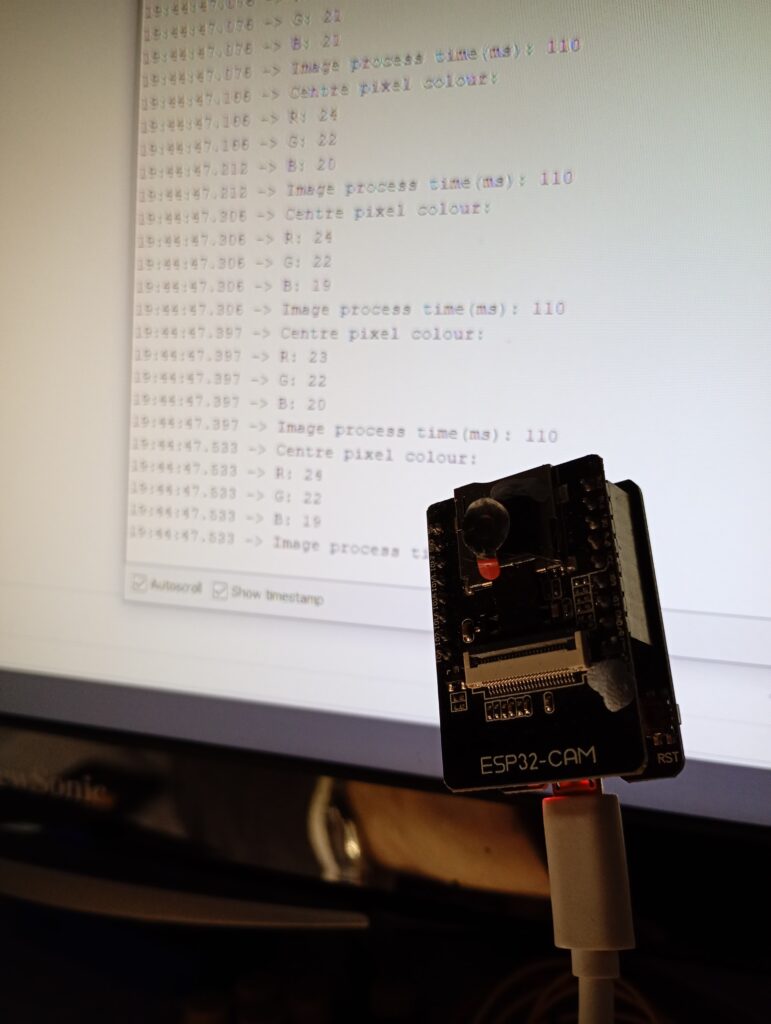
The program initialises the camera, then takes a photo, transfers the full frame data to the PSRAM and reports the frame time and RGB values of the centre pixel to the serial monitor. You can then move the camera from light to dark to see the values change.
Please note that the frame size is set to 240x240pixels, and as the output comes from a 16-bit RGB sensor value, the maximum values for the red and blue channel are limited to 31 (5 bits = 25-1), and 63 (6 bits = 26-1) for green.
Software – Code
#include "esp_camera.h"
#include <SPI.h>

#define CAMERA_MODEL_AI_THINKER
#define PWDN_GPIO_NUM     32
#define RESET_GPIO_NUM    -1
#define XCLK_GPIO_NUM      0
#define SIOD_GPIO_NUM     26
#define SIOC_GPIO_NUM     27
#define Y9_GPIO_NUM       35
#define Y8_GPIO_NUM       34
#define Y7_GPIO_NUM       39
#define Y6_GPIO_NUM       36
#define Y5_GPIO_NUM       21
#define Y4_GPIO_NUM       19
#define Y3_GPIO_NUM       18
#define Y2_GPIO_NUM        5
#define VSYNC_GPIO_NUM    25
#define HREF_GPIO_NUM     23
#define PCLK_GPIO_NUM     22

camera_config_t config;

int n_elements = 57600;
long initalTime = 0;
long frameTime;

void setup() {
  psramInit();

  config.ledc_channel = LEDC_CHANNEL_0;
  config.ledc_timer = LEDC_TIMER_0;
  config.pin_d0 = Y2_GPIO_NUM;
  config.pin_d1 = Y3_GPIO_NUM;
  config.pin_d2 = Y4_GPIO_NUM;
  config.pin_d3 = Y5_GPIO_NUM;
  config.pin_d4 = Y6_GPIO_NUM;
  config.pin_d5 = Y7_GPIO_NUM;
  config.pin_d6 = Y8_GPIO_NUM;
  config.pin_d7 = Y9_GPIO_NUM;
  config.pin_xclk = XCLK_GPIO_NUM;
  config.pin_pclk = PCLK_GPIO_NUM;
  config.pin_vsync = VSYNC_GPIO_NUM;
  config.pin_href = HREF_GPIO_NUM;
  config.pin_sscb_sda = SIOD_GPIO_NUM;
  config.pin_sscb_scl = SIOC_GPIO_NUM;
  config.pin_pwdn = PWDN_GPIO_NUM;
  config.pin_reset = RESET_GPIO_NUM;
  config.xclk_freq_hz = 20000000;
  config.frame_size = FRAMESIZE_240X240;
  config.pixel_format = PIXFORMAT_RGB565;
  config.grab_mode = CAMERA_GRAB_LATEST;
  config.fb_location = CAMERA_FB_IN_PSRAM;
  config.jpeg_quality = 12;
  config.fb_count = 2;

  esp_err_t err = esp_camera_init(&config);

  sensor_t * s = esp_camera_sensor_get();
  s->set_brightness(s, 0);     // -2 to 2
  s->set_contrast(s, 0);       // -2 to 2
  s->set_saturation(s, 0);     // -2 to 2
  s->set_special_effect(s, 0); // 0 to 6 (0 - No Effect, 1 - Negative, 2 - Grayscale, 3 - Red Tint, 4 - Green Tint, 5 - Blue Tint, 6 - Sepia)
  s->set_whitebal(s, 1);       // 0 = disable , 1 = enable
  s->set_awb_gain(s, 1);       // 0 = disable , 1 = enable
  s->set_wb_mode(s, 0);        // 0 to 4 - if awb_gain enabled (0 - Auto, 1 - Sunny, 2 - Cloudy, 3 - Office, 4 - Home)
  s->set_exposure_ctrl(s, 1);  // 0 = disable , 1 = enable
  s->set_aec2(s, 0);           // 0 = disable , 1 = enable
  s->set_ae_level(s, 0);       // -2 to 2
  s->set_aec_value(s, 300);    // 0 to 1200
  s->set_gain_ctrl(s, 1);      // 0 = disable , 1 = enable
  s->set_agc_gain(s, 0);       // 0 to 30
  s->set_gainceiling(s, (gainceiling_t)0);  // 0 to 6
  s->set_bpc(s, 0);            // 0 = disable , 1 = enable
  s->set_wpc(s, 1);            // 0 = disable , 1 = enable
  s->set_raw_gma(s, 1);        // 0 = disable , 1 = enable
  s->set_lenc(s, 1);           // 0 = disable , 1 = enable
  s->set_hmirror(s, 0);        // 0 = disable , 1 = enable
  s->set_vflip(s, 0);          // 0 = disable , 1 = enable
  s->set_dcw(s, 1);            // 0 = disable , 1 = enable
  s->set_colorbar(s, 0);       // 0 = disable , 1 = enable

  Serial.begin(115200);
  delay(1000);
}

void loop() {
  initalTime = millis();

  //allocate space on PSRAM - can be done in setup(), but doesn't save any time
  uint16_t *frame_buffer = (uint16_t *) ps_malloc(n_elements * sizeof(uint16_t));

  //take picture
  camera_fb_t  * fb = NULL;
  fb = esp_camera_fb_get();

  //Transfer camera buffer to buffer in PSRAM
  for (int i = 0; i < 57600; i++) {    //240x240px = 57600
    //create 16 bit colour from two bytes.
    byte first_byte = fb->buf[i * 2];
    byte second_byte = fb->buf[i * 2 + 1];
    frame_buffer[i] = (first_byte << 8) + second_byte;
  }

  //analyse centre pixel (number 28800 of 57600), and report colour values
  uint16_t R = (0b1111100000000000 & frame_buffer[28800]) >> 11;
  uint16_t G = (0b1111110000000000 & (frame_buffer[28800] << 5)) >> 10;
  uint16_t B = (0b1111100000000000 & (frame_buffer[28800] << 11)) >> 11;

  esp_camera_fb_return(fb);   //return the frame buffer back to the driver for reuse
  free(frame_buffer); //free up section of PSRAM

  frameTime = millis() - initalTime;
  Serial.println("Centre pixel colour:");
  Serial.print("R: ");  Serial.println(R);
  Serial.print("G: ");  Serial.println(G);
  Serial.print("B: ");  Serial.println(B);
  Serial.print("Image process time(ms): ");
  Serial.println(frameTime);
}
Best of luck!!
Page created: 19/03/2026
Last updated: 19/03/2026